Program Call
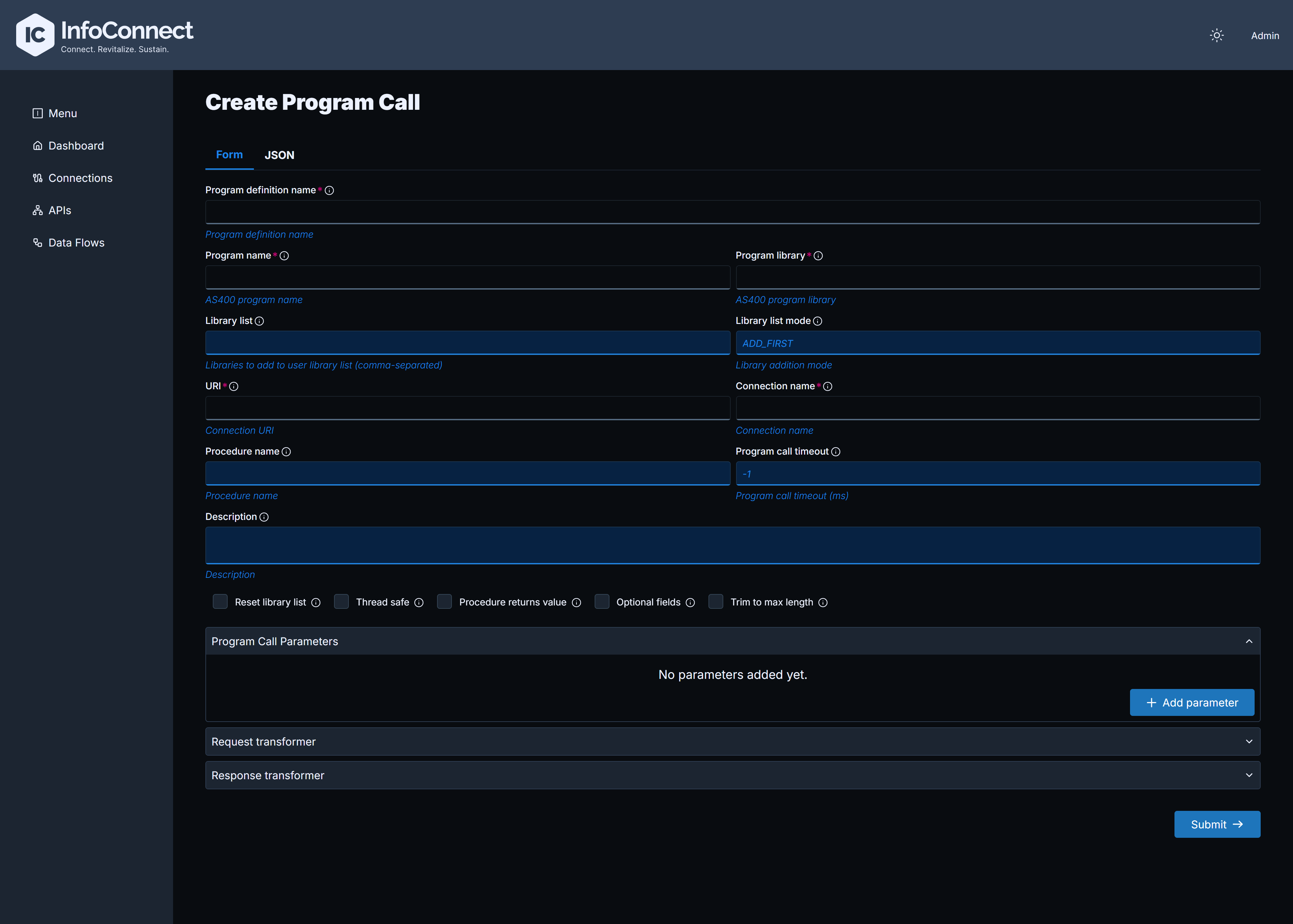
A Program Call surfaces an existing program on your IBM i as a REST API. It requires a Native Connection. The form has the following sections:
| Section | Content |
|---|---|
| Main fields (no section title) | Program Definition Name, Program name, Program library, URI, Connection Name (the Native Connection to use), Library list, Description and further options, see below |
| Program Call Parameters | The input and output parameters, see below |
| Request transformer, Response transformer | Optional. Transform the incoming request or the outgoing response with JSONata scripts |
The further options among the main fields are Procedure name, Program call timeout, Supported Http verbs, Schema validation, Query only, Thread safe, Optional fields, Trim to max length, Procedure returns value, Reset library list and Library list mode.
Click Add parameter to define each parameter with Parameter name, Data type, Length, Decimal positions, Count, Usage, Source field name, CCSID, DBCS and Description:
- Data types:
Big Integer,Binary,Byte Array,Date,Float,Integer,Packed,String,Structure,Short,Time,Timestamp,Unsigned Binary,Zoned. - Usage:
In,Out,In/Out. - For a
Structureparameter, define the nested elements in the Data Structure Elements accordion.
Sample JSON configuration for a Program Call API
{
  "programDefinitionName": "CRTORDER",
  "programName": "CRTORDER",
  "programLibrary": "HUBDEMOS",
  "uri": "/api/orders",
  "connectionName": "NATIVE",
  "resetLibraryList": false,
  "programCallParameters": {
    "params": [
      {
        "parameterName": "orderID",
        "sourceFieldName": "$['orderID']",
        "dataType": "PACKED",
        "length": 8,
        "usage": "INOUT"
      },
      {
        "parameterName": "extOrderID",
        "sourceFieldName": "$['externalOrderID']",
        "dataType": "PACKED",
        "length": 8,
        "usage": "INOUT"
      },
      {
        "parameterName": "orderAmt",
        "sourceFieldName": "$['orderAmount']",
        "dataType": "PACKED",
        "length": 10,
        "decimalPositions": 2,
        "usage": "INOUT"
      },
      {
        "parameterName": "orderStatus",
        "sourceFieldName": "$['orderStatus']",
        "dataType": "STRING",
        "length": 10,
        "usage": "INOUT"
      },
      {
        "parameterName": "orderLines",
        "sourceFieldName": "$['orderLines']",
        "dataType": "PACKED",
        "length": 4,
        "usage": "INOUT"
      },
      {
        "parameterName": "ORDERLINESIN",
        "sourceFieldName": "$['orderItemsIn']",
        "dataType": "STRUCTURE",
        "count": 10,
        "usage": "INOUT",
        "dataStructureElements": [
          {
            "parameterName": "ITEM",
            "sourceFieldName": "$['item']",
            "dataType": "STRING",
            "length": 10
          },
          {
            "parameterName": "QTY",
            "sourceFieldName": "$['qty']",
            "dataType": "PACKED",
            "length": 5
          },
          {
            "parameterName": "PRICE",
            "sourceFieldName": "$['price']",
            "dataType": "PACKED",
            "length": 10,
            "decimalPositions": 2
          }
        ]
      }
    ]
  },
  "threadSafe": false
}
You can also create a Program Call with the Admin API, see API Reference.