Custom programs
InfoCDC can call your own programs for each change of a table:
- A custom filter program decides whether InfoCDC sends a change or skips it. Use it when the column-based filtering on the Work with Table Columns screen is not enough, for example to filter on column values.
- A custom column program fills custom columns, which you add to the table configuration, and can also skip a change.
You set both programs per table. A table can have a filter program, a column program, or both.
Setting the programs for a table
- On the Work with Tables screen, use option 2 (Edit Columns) for the table.
-
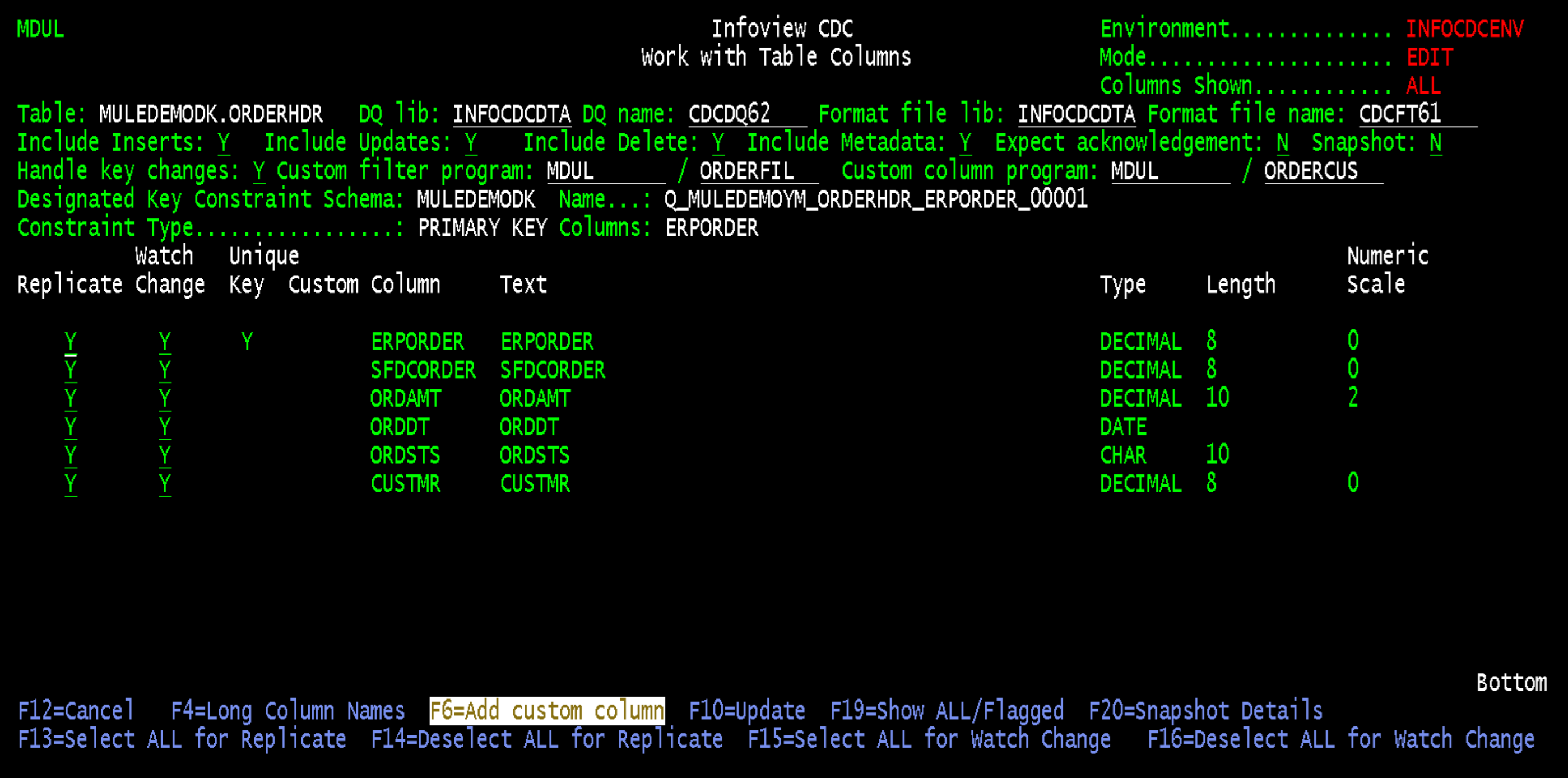
Enter the library and name of the program in Custom filter program, Custom column program, or both.
-
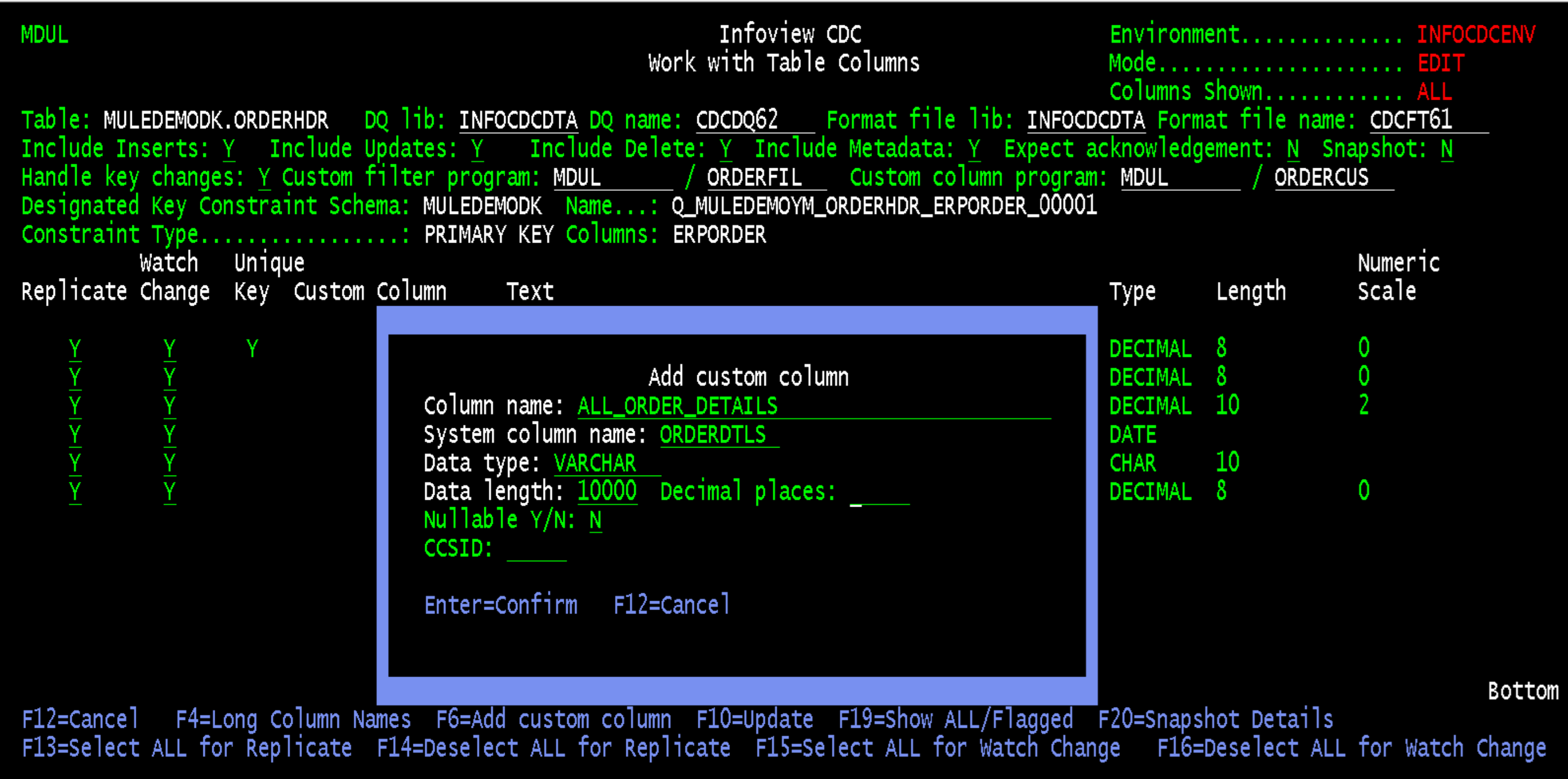
To add a custom column, press F6 (Add custom column) and enter the column name, the system column name, the data type, the length and decimal places, whether the column is nullable, and the CCSID. Press Enter to confirm.
The custom column is added to the list with
Yin the Custom column. InfoCDC adds it to the format table, so the consumers receive it like any other column.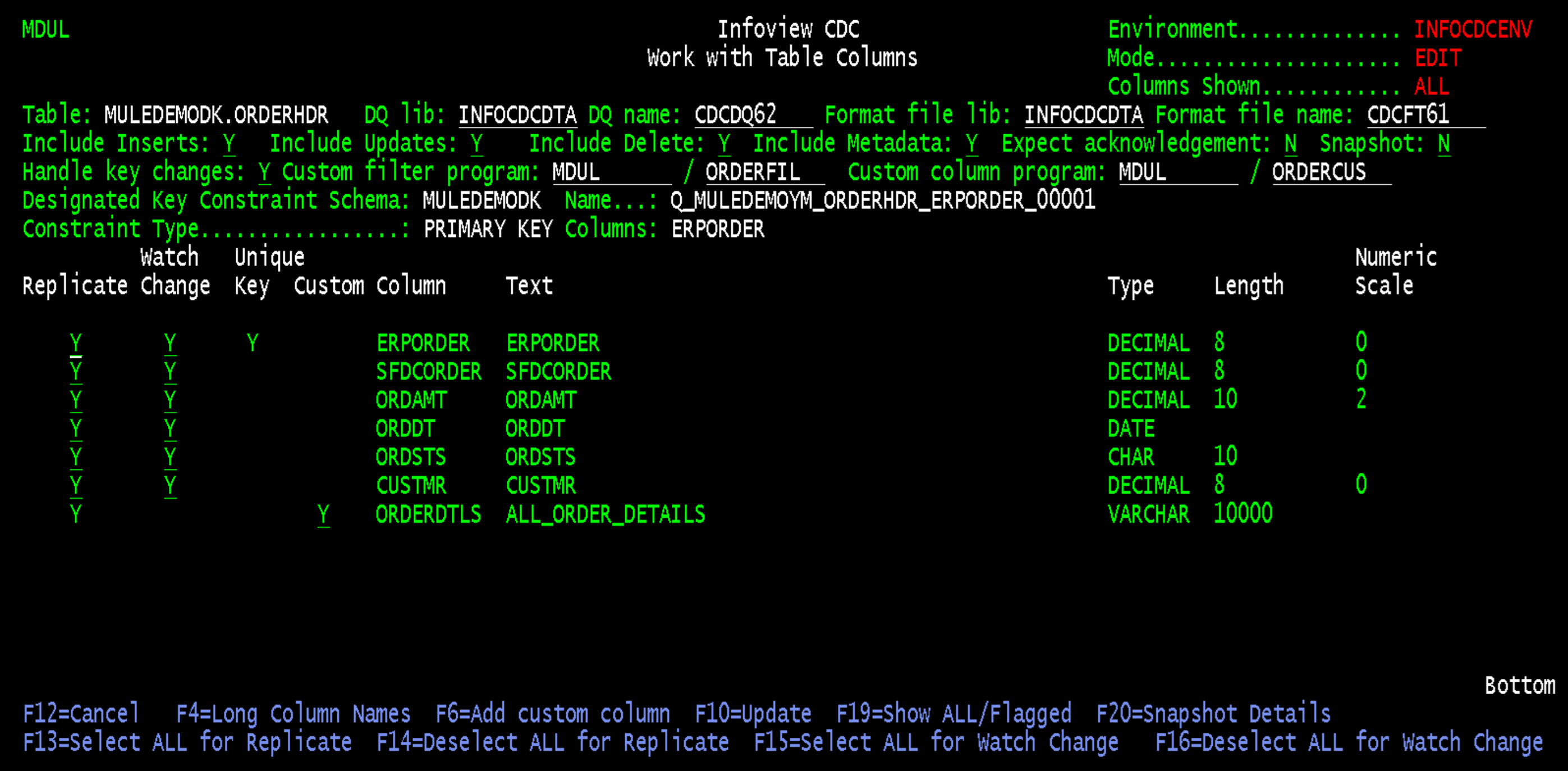
-
Press F10 to save the configuration.
Stop the replication flow before you change the configuration of a table that is being replicated. See Replication flow management.
Writing a program
Both programs are ILE programs with a fixed parameter list. The samples below are SQL RPG programs.
- Compile the programs for the same target release as InfoCDC. InfoCDC objects are compiled with
TGTRLS(V7R1M0). - The samples include the InfoCDC copy members
CDCCtlSpec,cdccpybook, andcdcrules_hfrom theQRPGLECPYsource file. - Declare a data structure based on the table (
extname) to read the column values from the record image by name. - Always set
skipRecord, and return errors inerrorCodeanderrorDescriptioninstead of ending with an unhandled exception.
Custom filter program
InfoCDC calls the filter program with the before and after image of the changed row. Set skipRecord to Y to skip the change or to N to send it.
| Parameter | Type | In / Out | Description |
|---|---|---|---|
systemTableName |
char(10) |
IN | System name of the table. |
systemTableSchema |
char(10) |
IN | System name of the table library. |
afterImage |
varchar(65535) |
IN | Row image after the change. |
beforeImage |
varchar(65535) |
IN | Row image before the change. Blank for an insert and for tables journaled with *AFTER images only. |
entryTimestamp |
char(26) |
IN | Timestamp of the journal entry. |
entryType |
char(2) |
IN | Journal entry type. |
changeProgramName |
char(10) |
IN | Program that made the change. |
changeUserName |
char(10) |
IN | User who made the change. |
skipRecord |
char(1) |
OUT | Y skips the change, N sends it. |
errorCode |
char(10) |
OUT | Error ID, blank on success. |
errorDescription |
varchar(1000) |
OUT | Error message, blank on success. |
The sample sends only the changes where the CLUB column is Manchester United before or after the change. Replace LIBNAME/FILENAME with your table and the condition with your own logic.
**free
  //
  // (C) 2025 Infoview Systems Inc
  // Description: Custom filter program to omit unwanted db changes
  //
  // CRTSQLRPGI OBJ(CDCCUSFIL) COMMIT(*NONE) OBJTYPE(*PGM) TGTRLS(V7R1M0) DBGVIEW(*SOURCE)

  ctl-opt main(CDCCUSFIL_Main);
  /define cdcctlpgm_defined
  /include qrpglecpy,CDCCtlSpec
  /undefine cdcctlpgm_defined

  /include qrpglecpy,cdccpybook

  /include qrpglecpy,cdcrules_h

  dcl-ds programStatusDs psds;
    errorId char(7) pos(40);
    errorMsg char(80) pos(91);
  end-ds;

  dcl-proc CDCCUSFIL_Main;

    dcl-pi *n;
      systemTableName char(10);
      systemTableSchema char(10);
      afterImage varchar(65535);
      beforeImage varchar(65535);
      entryTimestamp char(26);
      entryType char(2);
      changeProgramName char(10);
      changeUserName char(10);
      skipRecord char(1);
      errorCode char(10);
      errorDescription varchar(1000);
    end-pi;

    dcl-ds afterRecord extname('LIBNAME/FILENAME') qualified end-ds;
    dcl-ds beforeRecord extname('LIBNAME/FILENAME') qualified end-ds;

    monitor;
      errorCode = *blanks;
      errorDescription = *blanks;
      skipRecord = 'N';

      select;
        when beforeImage = *blanks;
          // check only after image
          afterRecord = afterImage;
          if afterRecord.CLUB <> 'Manchester United';           // example
            skipRecord = 'Y';
          endif;

        other;
          // check both before and after image
          afterRecord = afterImage;
          beforeRecord = beforeImage;
          if afterRecord.CLUB <> 'Manchester United'
             and beforeRecord.CLUB <> 'Manchester United';     // example
            skipRecord = 'Y';
          endif;
      endsl;

    on-error;
      errorCode = errorId;
      errorDescription = errorMsg;
    endmon;

    return;

  end-proc;
Custom column program
InfoCDC calls the column program with the formatted record image, which has the layout of the format table of the table, including the custom columns. The program sets the custom column values in the image and returns it. InfoCDC then processes the returned image as the change itself. skipRecord works the same way as in the filter program.
| Parameter | Type | In / Out | Description |
|---|---|---|---|
systemTableName |
char(10) |
IN | System name of the table. |
systemTableSchema |
char(10) |
IN | System name of the table library. |
formattedImage |
varchar(65535) |
IN / OUT | Record image in the format table layout. Set the custom columns in it. |
entryTimestamp |
char(26) |
IN | Timestamp of the journal entry. |
entryType |
char(2) |
IN | Journal entry type. |
changeProgramName |
char(10) |
IN | Program that made the change. |
changeUserName |
char(10) |
IN | User who made the change. |
skipRecord |
char(1) |
OUT | Y skips the change, N sends it. |
errorCode |
char(10) |
OUT | Error ID, blank on success. |
errorDescription |
varchar(1000) |
OUT | Error message, blank on success. |
Base the data structure on the format table of the table, which you find in Format file lib and Format file name on the Work with Table Columns screen. The sample fills the ORDERDTLS custom column of the ORDERHDR table shown above. Replace CDCFTnnn with your format table and the logic with your own.
**free
  //
  // (C) 2025 Infoview Systems Inc
  // Description: Custom column program - add custom columns to journal entry image
  //
  // CRTSQLRPGI OBJ(CDCCUSCOL) COMMIT(*NONE) OBJTYPE(*PGM) TGTRLS(V7R1M0) DBGVIEW(*SOURCE)

  ctl-opt main(CDCCUSCOL_Main);
  /define cdcctlpgm_defined
  /include qrpglecpy,CDCCtlSpec
  /undefine cdcctlpgm_defined

  /include qrpglecpy,cdccpybook

  /include qrpglecpy,cdcrules_h

  dcl-ds programStatusDs psds;
    errorId char(7) pos(40);
    errorMsg char(80) pos(91);
  end-ds;

  dcl-proc CDCCUSCOL_Main;

    dcl-pi *n;
      systemTableName char(10);
      systemTableSchema char(10);
      formattedImage varchar(65535);
      entryTimestamp char(26);
      entryType char(2);
      changeProgramName char(10);
      changeUserName char(10);
      skipRecord char(1);
      errorCode char(10);
      errorDescription varchar(1000);
    end-pi;

    // format table of the replicated table
    dcl-ds formattedRecord extname('INFOCDCDTA/CDCFTnnn') qualified end-ds;

    monitor;
      skipRecord = 'N';
      formattedRecord = formattedImage;

      // fill the custom column
      if formattedRecord.ORDSTS = 'SHIPPED';                    // example
        formattedRecord.ORDERDTLS = 'Order shipped';
      else;
        formattedRecord.ORDERDTLS = 'Order open';
      endif;

      formattedImage = formattedRecord;
    on-error;
      errorCode = errorId;
      errorDescription = errorMsg;
    endmon;

    return;

  end-proc;